
Choosing your first professional video editor can sometimes feel harder than editing your first video.
Search for Premiere Pro vs DaVinci Resolve, and you’ll find countless comparisons, feature lists, tutorials, and AI-generated recommendations telling you which software is “the best.” For beginners, however, choosing the right video editor is about more than simply comparing features. At sufstudio, we focus on practical creative workflows that help beginners understand tools like Premiere Pro and DaVinci Resolve in a simple and useful way. But a list of features doesn’t answer the question a beginner actually has: Which video editor should I choose based on my budget, experience, and creative goals?
Which editor should I learn first?
Both Premiere Pro and DaVinci Resolve are powerful enough for professional video production. However, they approach editing differently. Your budget, computer, career goals, and the type of content you want to create can make one a better starting point than the other.
As an aspiring video editor who has worked with Premiere Pro and CapCut and completed 5+ practice projects, I’ve found that choosing editing software isn’t about finding a universal winner. It’s about finding the workflow you can understand, practice, and eventually use confidently for real projects.
There’s also a growing problem with software comparisons: AI can generate a polished comparison in seconds without actually testing either program. That’s why this guide focuses on practical beginner considerations rather than simply repeating specifications.
What Is the Difference Between Premiere Pro vs DaVinci Resolve?
Premiere Pro is Adobe’s professional video-editing application, while DaVinci Resolve combines editing, color grading, visual effects, motion graphics, and audio post-production in one application.
At a basic level, both programs let you import footage, arrange clips on a timeline, add audio and graphics, edit your story, and export a finished video.
The biggest difference becomes clearer when you look at their overall ecosystems. This is one of the key factors to consider when comparing Premiere Pro vs DaVinci Resolve.
Premiere Pro is part of Adobe’s creative ecosystem. If you already use Photoshop or eventually want to work with After Effects, Premiere can fit naturally into that workflow.
DaVinci Resolve, developed by Blackmagic Design, takes a more integrated approach. Editing, Fusion visual effects, Fairlight audio, and professional color tools are available within the same application.
For a beginner, that means neither program is simply “better.” They offer different paths toward the same basic goal: creating better videos.
Which Is Easier for Beginners: Premiere Pro or DaVinci Resolve?
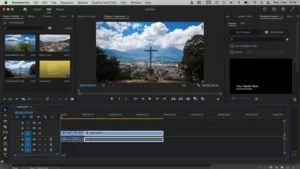
Both can be learned by beginners, but Premiere Pro may feel more straightforward if your immediate goal is basic timeline editing, while Resolve can feel more complex because it exposes more post-production capabilities in one application.
When you first open either program, you may feel overwhelmed. That’s normal. Understanding the differences between Premiere Pro vs DaVinci Resolve can make the learning process easier for beginners.
A beginner doesn’t need to understand every panel, effect, color tool, or audio setting on day one.
Start with the basics:
- Import your footage.
- Create a timeline.
- Cut unwanted sections.
- Arrange clips.
- Add music.
- Add text or captions.
- Adjust basic audio.
- Export the video.
Once these steps become familiar, the more advanced features become easier to understand. Whether you choose Premiere Pro vs DaVinci Resolve, consistent practice matters more than learning every feature at once.
Where Can Beginners Get Confused?
Premiere Pro has many panels, tools, shortcuts, effects, and settings. Resolve can feel even broader because it separates workflows into dedicated areas such as Edit, Fusion, Color, and Fairlight.
That can be intimidating initially, but it can also become an advantage as your skills develop.
Don’t judge software only by your first 30 minutes with it. A professional editor is complicated because professional work is complicated.
Is DaVinci Resolve Better for Beginners Because It Is Free?
DaVinci Resolve is particularly attractive to beginners because its free version provides a substantial professional editing and post-production toolkit.
For someone learning video editing without a large budget, this matters.
You can spend your early months learning:
- Cutting
- Pacing
- Transitions
- Audio
- Color correction
- Titles
- Basic visual effects
- Export settings
without immediately committing to a subscription.
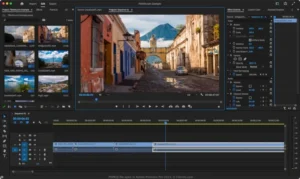
That’s especially useful for students and aspiring freelancers who are still deciding whether video editing will become a serious career.
Is the Free Version Enough to Learn Video Editing?
For many beginners, yes.
You don’t need every advanced feature to learn the fundamentals of editing.
In fact, beginners sometimes make the mistake of believing that expensive software automatically produces better videos.
It doesn’t.
A good editor with basic tools can create a better video than a beginner with expensive software who doesn’t understand storytelling or pacing.
DaVinci Resolve’s free version therefore makes it a compelling starting point for someone who wants to learn professional editing while keeping costs low.
Is Premiere Pro Worth Paying for as a Beginner?
Premiere Pro can be worth paying for if you want to build your skills around Adobe’s creative ecosystem or already use applications such as Photoshop.
This is where your long-term goals matter.
If you are interested in graphic design and video editing, an Adobe workflow can be particularly useful. You may create a thumbnail in Photoshop, edit the video in Premiere Pro, and later use After Effects for motion graphics.
That interconnected workflow can save time once you become comfortable with it.
However, beginners should also consider the cost. When comparing Premiere Pro vs DaVinci Resolve, your budget and long-term editing goals should be important factors in the decision.
If you’re only experimenting with video editing and aren’t sure whether you’ll continue, paying for software immediately may not be necessary.
Your first goal should be building editing skills, not collecting software subscriptions.
Which Has Better Color Grading: Premiere Pro or DaVinci Resolve?
DaVinci Resolve is the stronger choice if professional color grading is one of your main interests.
Color is one of Resolve’s biggest strengths.
Its dedicated Color workspace provides tools designed specifically for detailed color correction and grading. As you progress, you can explore:
- Color wheels
- Curves
- Scopes
- Nodes
- Secondary corrections
- Professional grading workflows
Premiere Pro also provides capable color tools, and they are more than enough for many beginner projects.
If you’re creating YouTube videos, Reels, promotional videos, or simple social media content, you don’t necessarily need an advanced color-grading workflow immediately.
The important lesson is:
Learn basic color correction before worrying about cinematic color grades.
Understand exposure, white balance, contrast, saturation, and skin tones first. Advanced tools can come later.
Which Is Better for YouTube Beginners?
Both Premiere Pro and DaVinci Resolve are capable YouTube editors, so your budget and preferred workflow should determine the choice.
For a basic talking-head video, you need relatively simple tools:
- Cutting
- B-roll
- Background music
- Voice editing
- Captions
- Basic color
- Titles
- Export
Both applications can handle these tasks.
What If You Want to Create YouTube Shorts and Reels?
Again, both can work well.
The software matters less than understanding vertical video, pacing, captions, hooks, and audience retention.
A beginner can spend hours learning advanced effects and still create a boring video if the storytelling isn’t strong.
Editing software is a tool. Storytelling is the skill.
Which Is Better for Freelance Video Editing?
Both Premiere Pro and DaVinci Resolve can support freelance video editing, so beginners should focus on mastering one workflow and building a strong portfolio.
This is particularly important when you’re just starting.
As an aspiring freelancer, you don’t need to know every editing program before approaching potential clients.
You need to demonstrate that you can:
- Follow a brief
- Organize footage
- Edit cleanly
- Maintain consistent pacing
- Handle audio
- Add appropriate graphics
- Make revisions
- Deliver files correctly
A client is unlikely to hire you simply because you can name ten editing applications.
They want to know whether you can solve their video problem.
Do Clients Care Which Software You Use?
Some clients may have specific workflows or project requirements, but software alone doesn’t determine the quality of your work.
A clean, engaging video created in Resolve can be more valuable than a poorly edited video created in Premiere Pro.
That’s why I would recommend beginners choose one editor and practice consistently instead of constantly switching between applications.
Which Editor Is Better for Someone Moving From CapCut?
If you’ve already learned basic editing in CapCut, moving to Premiere Pro or DaVinci Resolve can be a useful next step when you want more control over professional workflows.
CapCut is approachable for beginners, particularly for short-form social content.
The transition to desktop professional software can initially feel difficult because you encounter more options and controls.
From my own learning experience with CapCut and Premiere Pro, one important lesson is that moving to professional software isn’t about learning hundreds of buttons.
It’s about understanding the same fundamental concepts at a deeper level:
Timeline → cuts → pacing → audio → visuals → color → export.
Once those concepts are clear, learning a different editing application becomes much easier.
Which Editor Has Better AI Features?
Both Premiere Pro and DaVinci Resolve increasingly use AI to automate repetitive tasks, but AI should assist an editor rather than replace editing judgment.
This is an important distinction.
AI can help with tasks such as transcription, captions, media organization, audio enhancement, masking, and other repetitive processes.
That can save time.
But AI doesn’t automatically know whether a particular shot should remain in a video because it contributes to the story. It doesn’t replace your creative decisions about pacing, emotion, visual hierarchy, or audience.
This is similar to AI-assisted content writing.
A completely automated workflow may produce technically polished material, but human experience and judgment are what make content authentic and trustworthy. AI can support the workflow, but it should not remove the human from it.
The same principle applies to video editing.
A Better AI Workflow
A practical approach is:
Human strategy → AI assistance → Human editing → Human review → Final output
Use AI where it saves time.
Use your own judgment where creativity matters.
What Computer Do You Need for Premiere Pro and DaVinci Resolve?
Your computer’s CPU, GPU, RAM, storage, and video resolution can significantly affect how comfortable either editor feels.
A beginner working with 1080p footage may have a very different experience from someone editing 4K footage with heavy effects.
Before choosing software, consider:
- How much RAM your computer has
- Your processor
- Your graphics card
- Available storage
- SSD versus HDD
- Video resolution
- Footage codec
- Number of effects used
Should You Test Both on Your Computer?
Yes, if possible.
This is one of the best ways to make the decision.
Use the same:
- Computer
- Video clips
- Timeline
- Project resolution
- Export settings
Then compare playback, editing responsiveness, and export experience.
Don’t rely only on someone else’s benchmark.
Your computer and your workflow are different from theirs.
Premiere Pro vs DaVinci Resolve: Which One Should You Choose?
Choose DaVinci Resolve if affordability and color grading are major priorities; choose Premiere Pro if you want an Adobe-centered workflow or plan to combine video editing with other Adobe applications.
Choose DaVinci Resolve if:
- You want a powerful free option.
- You’re working with a limited budget.
- You’re interested in color grading.
- You want editing, color, VFX, and audio in one application.
- You’re willing to spend time learning its broader interface.
Choose Premiere Pro if:
- You already use Photoshop.
- You want to explore the Adobe ecosystem.
- You plan to learn After Effects.
- You want an Adobe-centered workflow.
- You prefer its timeline editing environment.
Choose Either If:
- You’re making YouTube videos.
- You’re creating Reels or Shorts.
- You’re building a beginner portfolio.
- You’re learning editing fundamentals.
- You’re starting freelance work.
There is no universal winner.
The best choice is the software you’ll actually open, practice with, and use to complete projects.
What Should Beginners Learn Before Advanced Video Editing?
Beginners should master editing fundamentals before focusing on advanced effects, plugins, or AI tools.
A good learning order is:
- Import and organize footage
- Cut and trim clips
- Understand timeline editing
- Learn pacing and storytelling
- Improve audio
- Learn basic color correction
- Add text and captions
- Use B-roll effectively
- Learn transitions without overusing them
- Understand export settings
Once you can create a clean video without constantly searching for tutorials, start exploring advanced features.
Your goal isn’t to memorize software.
Your goal is to become a better editor.
Premiere Pro vs DaVinci Resolve: The Final Verdict
For a beginner on a tight budget, DaVinci Resolve is arguably the easier recommendation because its free version gives you room to learn without an immediate subscription. For someone building skills around Adobe applications, Premiere Pro may be the better long-term choice.
For my own development as an aspiring video editor, Premiere Pro makes sense because it connects with skills I’m already developing in Photoshop, Canva, graphic design, and digital marketing.
But that doesn’t make it the right choice for every beginner.
If you’re starting with almost no budget and want to explore professional editing, try DaVinci Resolve first.
If you’re already interested in Adobe’s ecosystem and want to combine graphic design, video editing, and motion graphics, Premiere Pro is worth learning.
And if you’re still unsure?
Don’t spend weeks comparing screenshots.
Download the software you can access, create one real 60-second video, and see which workflow makes more sense to you.
That experience will tell you more than another twenty comparison articles.
Frequently Asked Questions
Is Premiere Pro or DaVinci Resolve better for beginners?
DaVinci Resolve is particularly attractive for beginners on a budget because of its free version, while Premiere Pro is a strong option for those who want an Adobe-centered workflow.
Is DaVinci Resolve completely free?
DaVinci Resolve has a substantial free version, while DaVinci Resolve Studio is the paid version with additional capabilities.
Is Premiere Pro worth paying for as a beginner?
It can be worthwhile if you’re serious about learning video editing and want to work within Adobe’s creative ecosystem. If you’re only experimenting, a free option may make more sense initially.
Which is better for YouTube?
Both are capable YouTube editors. The more important factors are your editing skills, storytelling, audio, pacing, and consistency.
Which has better color grading?
DaVinci Resolve is generally the stronger choice for dedicated color-grading work.
Should I learn both?
You can eventually learn both, but beginners will usually benefit more from mastering one editor first.
Is Premiere Pro better than CapCut?
Premiere Pro offers a more professional and extensive editing environment, while CapCut is often easier for quick social-media editing. The right choice depends on the type of content you’re creating.
Author Box & Reviewer Note
About the Author
Mohammed Sufail is an aspiring Graphic Designer, Video Editor, and Digital Marketer with practical skills in Photoshop, Canva, Premiere Pro, and CapCut. He has completed 5+ practice projects while developing hands-on experience as a beginner freelancer.
His work focuses on creating clean, engaging visual designs and digital content that help brands strengthen their online presence. He is also exploring AI-assisted creative workflows while keeping human creativity, practical experience, and quality control at the center of the process.
Reviewer Note
Editorial focus: Beginner video editing, software comparison, practical learning experience, and responsible use of AI.
Experience disclosure: This article should distinguish between the author’s direct experience with software and information obtained from official documentation or other external sources.
Recommended update practice: Review software features, pricing, system requirements, and AI capabilities periodically because these can change with new releases.
Last Updated: [Month, Year]
Final SEO Note
For this article, don’t try to make it sound like you are a 10-year professional editor. Your strongest E-E-A-T advantage is actually your real beginner journey: 5+ practice projects, Premiere Pro + CapCut experience, graphic-design knowledge, and your transition toward freelance work.
That makes the article more believable than a generic “expert” comparison—and gives you a genuine personal angle that AI-generated comparison pages cannot easily reproduce.